
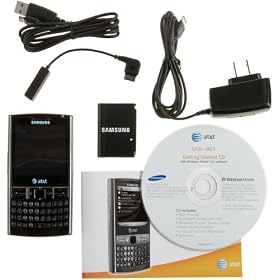
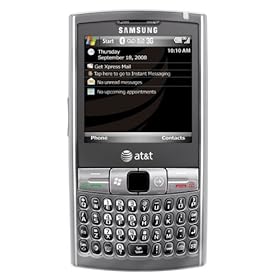
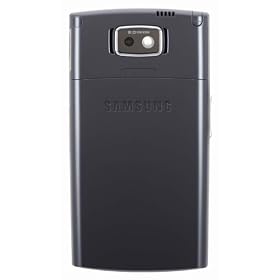
IMO, this is the best smartphone currently available, but it did take me a little while to get it there.
My priority was a phone that would work with our Exchange 2007 system (without installing the Blackberry server and server certs), provide WiFi, let me dial one-handed without looking at the phone, and have usual fun goodies. In addition, I use a database app for the PPC, and this one handles it fine (Windcows Mobile comes in two versions - Smartphone and PPC; most phones run under the Smartphone edition but the EPIX adds the required touchscreen and stylus for full PPC apps).
Pros: Loaded with features: GPS, stereo Bluetooth, GPS, Exchange 7 compatible, WiFi, excellent voice dialing recognition, nice touchpad, great battery life, small enough to fit in the pocket, and keyboard allows one-handed dialing with some practice. Keys are small, but separation is adequate. Provides the higher-end WinMobile PPC rather than SmartPhone OS.
Cons: The default configuration does not provide a very good out-of-box experience; WiFi didn't allow surfing initially, and WiFi support from the usual sources was not adequate (you will see lots of complaints that WiFi doesn't work. However, there is a simple solution.
The good news is that everything eventually worked:
1. Internet now defaults to WiFi if available and only switches to slower 3G when WiFi is not available. Had to go to the MS WinMobile user group site to find the solution (disable the Proxy server, but do it from a clean hard boot).
2. I wanted to use the phone routinely without the stylus. One of the highly frustrating issues initially was that there are no dedicated 5-way navigation keys; modifying the touchpad for that function (an option) didn't make sense. But you can reassign the function of four keys on the lower row, and that gives you both mouse and 5-way navigation.
3. Downloading the Google Mobile desktop toolbar is a must. Goes onto your desktop as a transparent search bar. I had initially installed the Opera browser, but went back to IE after installing Google. Tried the LiveSearch application, but (a) it kept changing my keyboard to symbols and (b) it thought I was always trying to look up something close to my geographical location (instead of letting me look up a WikTionary word to settle a bet with my wife).
4. After transfering my contact list from Outlook, voice dialing worked well without training, and far better than my RAZR. If you want to type instead of talk, then the search algorithm is another nice improvement (at least over my RAZR); simultaneously looks for a match on either a name or phone from your typing.
5. Rhapsody To Go worked for me, but it's theoretically not supported yet on WinMobile, and I did find a few anomalies when transferring music files.
Problems have been minimal. OS 6.1 has been stable, with the only lockup coming when I tried to use voice commands with the ATT Navigator/ GPS service. Only thing I haven't figured out is an initial delay in switching over to my Bluetooth car speaker when receiving the first incoming call; works OK after that.
Overall, this phone is doing exactly what I hoped it would do.
My priority was a phone that would work with our Exchange 2007 system (without installing the Blackberry server and server certs), provide WiFi, let me dial one-handed without looking at the phone, and have usual fun goodies. In addition, I use a database app for the PPC, and this one handles it fine (Windcows Mobile comes in two versions - Smartphone and PPC; most phones run under the Smartphone edition but the EPIX adds the required touchscreen and stylus for full PPC apps).
Pros: Loaded with features: GPS, stereo Bluetooth, GPS, Exchange 7 compatible, WiFi, excellent voice dialing recognition, nice touchpad, great battery life, small enough to fit in the pocket, and keyboard allows one-handed dialing with some practice. Keys are small, but separation is adequate. Provides the higher-end WinMobile PPC rather than SmartPhone OS.
Cons: The default configuration does not provide a very good out-of-box experience; WiFi didn't allow surfing initially, and WiFi support from the usual sources was not adequate (you will see lots of complaints that WiFi doesn't work. However, there is a simple solution.
The good news is that everything eventually worked:
1. Internet now defaults to WiFi if available and only switches to slower 3G when WiFi is not available. Had to go to the MS WinMobile user group site to find the solution (disable the Proxy server, but do it from a clean hard boot).
2. I wanted to use the phone routinely without the stylus. One of the highly frustrating issues initially was that there are no dedicated 5-way navigation keys; modifying the touchpad for that function (an option) didn't make sense. But you can reassign the function of four keys on the lower row, and that gives you both mouse and 5-way navigation.
3. Downloading the Google Mobile desktop toolbar is a must. Goes onto your desktop as a transparent search bar. I had initially installed the Opera browser, but went back to IE after installing Google. Tried the LiveSearch application, but (a) it kept changing my keyboard to symbols and (b) it thought I was always trying to look up something close to my geographical location (instead of letting me look up a WikTionary word to settle a bet with my wife).
4. After transfering my contact list from Outlook, voice dialing worked well without training, and far better than my RAZR. If you want to type instead of talk, then the search algorithm is another nice improvement (at least over my RAZR); simultaneously looks for a match on either a name or phone from your typing.
5. Rhapsody To Go worked for me, but it's theoretically not supported yet on WinMobile, and I did find a few anomalies when transferring music files.
Problems have been minimal. OS 6.1 has been stable, with the only lockup coming when I tried to use voice commands with the ATT Navigator/ GPS service. Only thing I haven't figured out is an initial delay in switching over to my Bluetooth car speaker when receiving the first incoming call; works OK after that.
Overall, this phone is doing exactly what I hoped it would do.




0 comments:
Post a Comment